A Booking.com iCal sync usually takes between 30 minutes and a few hours to show up on Airbnb or another platform, and it can take longer on busy weekends and holidays. The delay isn't a fault. It's how iCal works: each platform checks the other's calendar on its own timer, and nothing tells it when something changes.
Key takeaways
- Expect 30 minutes to 3 hours in normal conditions, longer at peak times.
- Booking.com doesn't publish a guaranteed refresh interval, so test your own.
- The delay only causes trouble for bookings that arrive close together for the same dates.
- A one day booking notice and a manual check on busy dates remove most of the risk.
The short answer: how long the delay is
In normal conditions, a booking on one platform appears on the other within 30 minutes to 3 hours. During holidays, long weekends and big local events, hosts report waits of 4 to 6 hours.
There's no official number from Booking.com, so the only reliable figure is the one you measure yourself. The test takes two minutes to set up: block a night far in the future and time how long it takes to appear.
Takeaway: plan around a few hours, not a few minutes.
Why iCal can't be instant
iCal works like checking a noticeboard. Booking.com publishes a list of your taken dates at a web address. Airbnb visits that address now and then to read it. Between visits, Airbnb has no idea anything changed.
There's no "ping" when a guest books. The other platform finds out only on its next visit. So the delay is the time until that next visit, and each platform decides for itself how often to come back.
A direct connection (an API) works differently. The booking is pushed to the other side the moment it happens. That's what paid channel managers sell.
Takeaway: iCal is a timer, not a notification. The gap is built in.
The delay on each side
There are two separate delays, one for each direction:
| Direction | Who sets the timer | Typical wait |
|---|---|---|
| Airbnb booking appears on Booking.com | Booking.com | 30 minutes to a few hours |
| Booking.com booking appears on Airbnb | Airbnb | often up to 3 hours |
If you route sync through a PMS or central calendar instead of linking the two platforms directly, add its check time too. Hostberg, for example, imports connected calendars once a day, with a "Sync calendars now" button for when you need it sooner. So keep the direct link between Airbnb and Booking.com for blocking dates, and use the central calendar to see everything in one place.
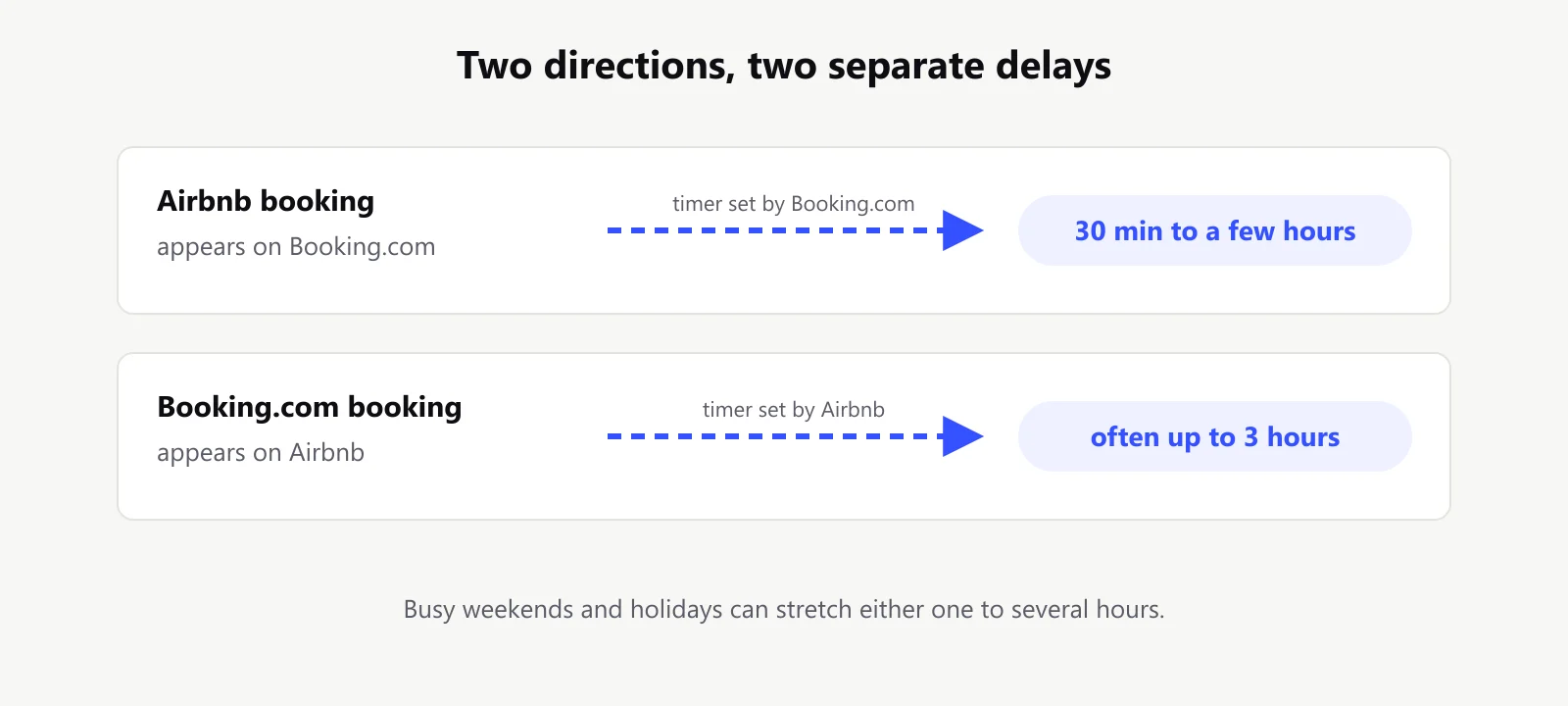
Takeaway: your real risk window is the slower of the two directions.
When the delay actually costs you
Most of the time, the delay doesn't matter. A booking for a date three weeks away will sync long before anyone else tries to book that night.
It matters when two guests want the same night at almost the same time. Here's how it plays out on a busy Saturday:
- 10:05 A guest books Room 2 for tonight on Booking.com.
- 10:40 Booking.com's calendar shows the night as taken. Airbnb hasn't checked yet.
- 11:15 Another guest books Room 2 for tonight on Airbnb. Airbnb still thinks it's free.
- 12:30 Airbnb finally reads the Booking.com calendar. Too late. Room 2 is double booked.
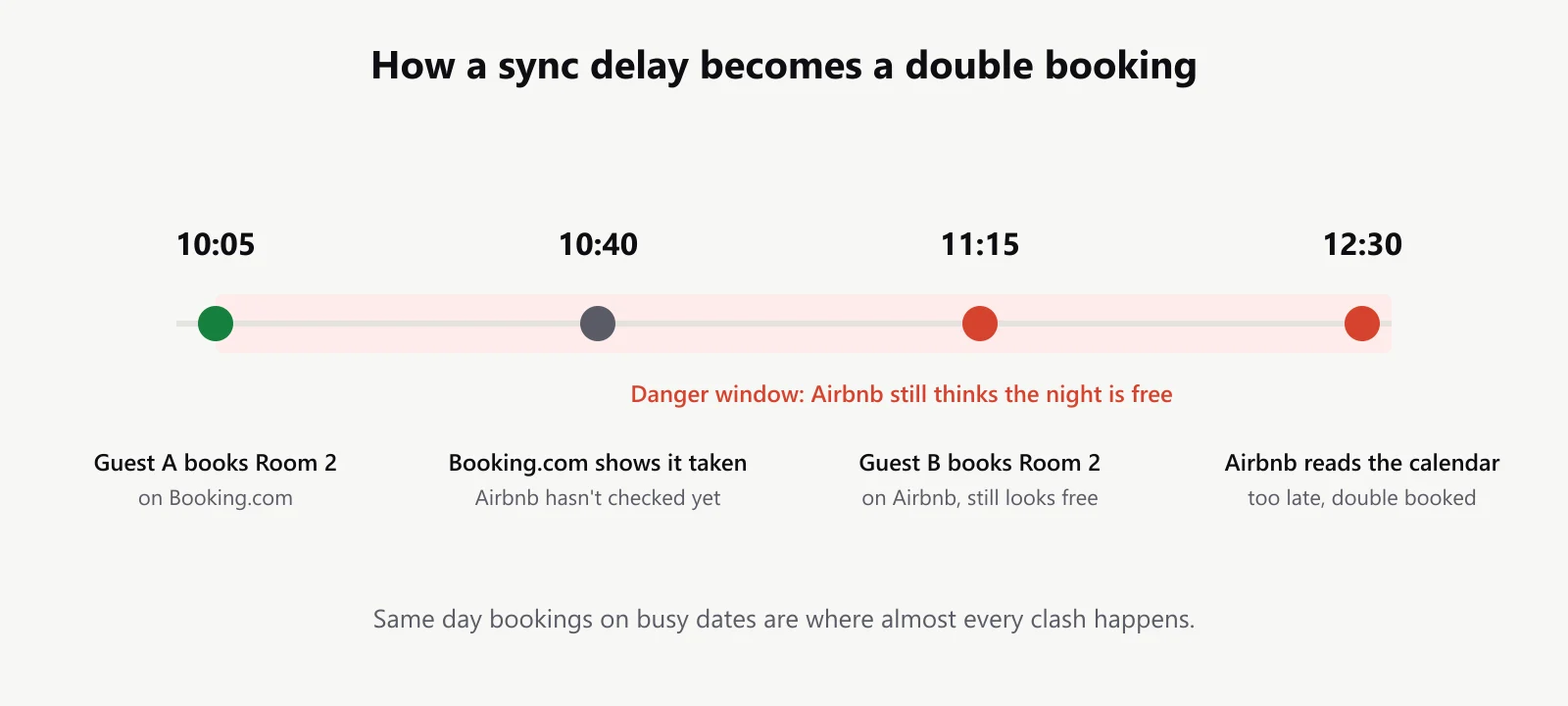
That window opens most often for same day and next day bookings, on popular dates, at properties with few rooms where every night counts.
Takeaway: the risk sits almost entirely in last minute bookings on busy dates.
What you can control
You can't change Booking.com's or Airbnb's timers, but you can make the gap far less dangerous:
- Set a minimum booking notice of one day on both platforms. This closes the same day window, where most clashes happen.
- Refresh by hand when you can. Some tools and PMSs have a "sync now" button. Use it right after a booking for a busy date.
- Block hot dates yourself. When a booking lands for a holiday or event weekend, block those nights on the other platform immediately instead of waiting for the sync.
- Check both calendars once each morning during peak season. It takes two minutes.
Takeaway: a one day notice plus a quick morning check handles almost every case.
What you can't control, and how to live with it
If last minute bookings are a big part of your business, iCal will always carry some risk. The only way to remove the delay entirely is a direct connection through a channel manager, which usually costs a monthly fee per property.
For a small guesthouse or a handful of apartments, that's often more than the occasional double booking costs. Manual entry vs API sync walks through where the real difference shows up, and how to stop double bookings covers the habits that close the gap without paying for one.
Takeaway: pay for real time sync only when last minute bookings are common for you.
Frequently asked questions
How often does Booking.com update iCal?
Booking.com doesn't publish an exact interval. In practice, hosts see changes within 30 minutes to a few hours, and longer at peak times.
How often does Airbnb sync imported calendars?
Hosts commonly see Airbnb pick up imported calendar changes within about 3 hours.
Can I force Booking.com to sync immediately?
Not from Booking.com itself. Some PMS tools offer a manual refresh on their side, but the other platform still reads it on its own schedule.
My booking never synced. Is that still the delay?
If it hasn't appeared after 12 hours, it's probably a setup problem, not the delay. Work through the checks for calendars that stop syncing.
Bottom line
The iCal delay is normal, it's usually a few hours, and it only bites when two guests want the same night at almost the same time. A booking notice and a manual check on busy dates cover you.
Hostberg shows every booking from both channels in one calendar, and its "Sync calendars now" button pulls in the latest the moment you need it, so you can spot a clash before your guest does. See the calendar.